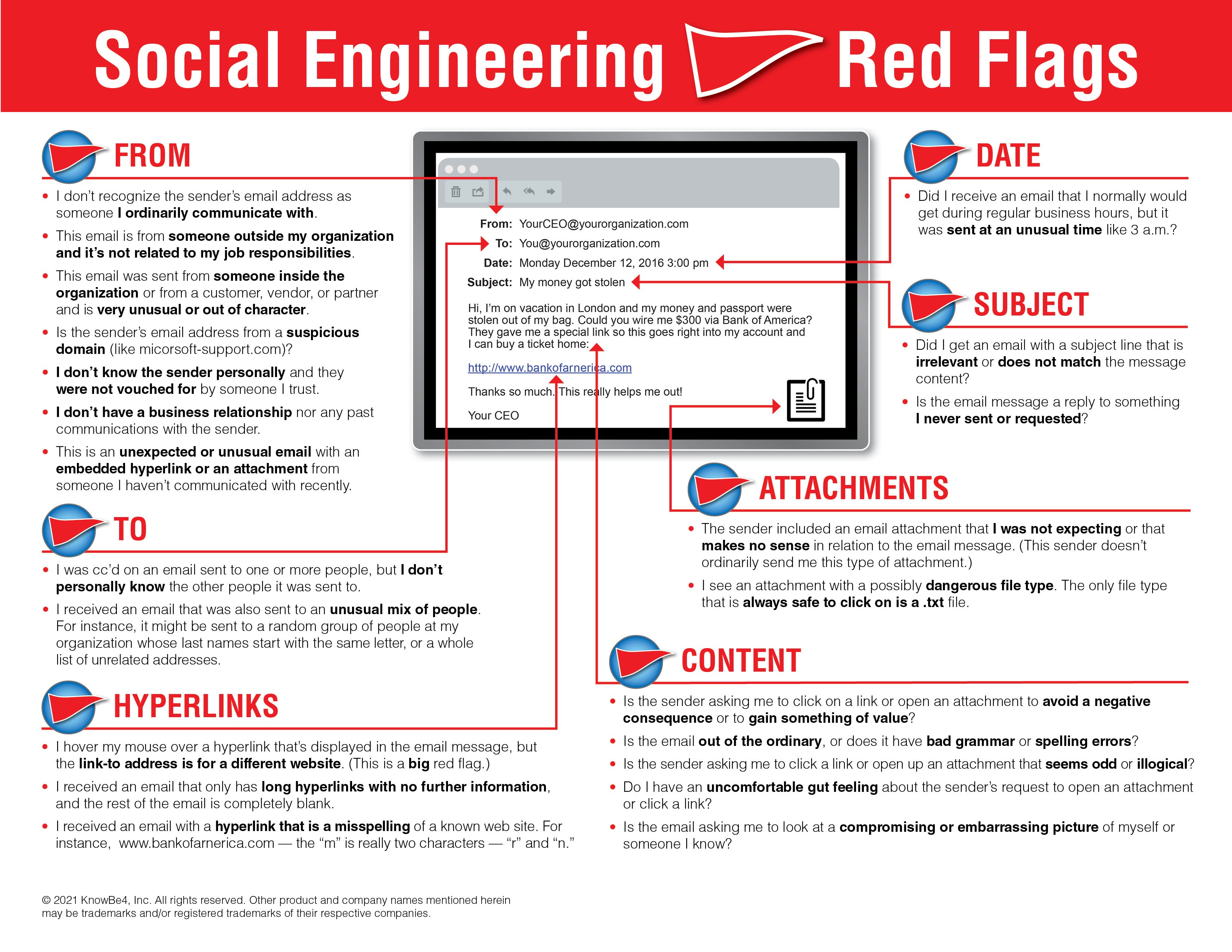
Social Engineering Red Flags
Hello Team,
We want to alert everyone to a recent increase in scam and
social engineering attempts targeting individuals through email, SMS/text
messages, and social media. These attackers are becoming increasingly
sophisticated and may impersonate trusted individuals or organizations to trick
you into sharing sensitive information, clicking malicious links, or even
revealing your two-factor authentication (2FA) codes—allowing them to bypass
security measures and access your accounts despite Multi-Factor Authentication
(MFA) being enabled.
What to Watch Out For:
Please remain vigilant and look for these common red flags:
🔹 Urgency or Pressure
– Messages that demand immediate action, such as “your account will be locked”
or “urgent payment needed.”
🔹
Unusual Requests – Asking for gift cards, wire transfers, passwords, or
sensitive data.
🔹
Generic or Unexpected Messages – Poor grammar, odd phrasing, or messages
that don’t sound like the person supposedly sending them.
🔹 Don’t Rely on Grammar Alone – Don't assume good grammar means it's a trusted sender. AI makes it easier for scammers to produce messages without the spelling mistakes and awkward wording that traditionally made phishing easier to identify.
🔹
Suspicious Links or Attachments – Hover over links before clicking and
double check the spelling. If it looks strange or unfamiliar, don’t click it.
Hyperlinks to websites that look like the actual domain but might have a letter
replaced with something which looks like it is very common.
🔹 Familiar Names or Emails - The sender email will look like a trusted sender but will have slight differences to trick you, such as "email@trusted.com" compared to a similar fake "emaiI@trust3d.com", the L in "email" actually being a capital I, and the e in "trusted" being a 3.
🔹
Unknown Senders or Spoofed Contacts – A familiar name with an unfamiliar
email or phone number is a red flag. On mobile devices, it might only show the
name of the sender, and you will need to expand the “from” field to see the
actual senders email.
🔹 Secrecy or Confidentiality – Requests that you keep the transaction or conversation secret or avoid contacting others to verify it
🔹 Promise of Reward - Unexpected prizes, refunds, job offers, investments, or other opportunities that require you to provide information or payment
Best Practices to Stay Safe:
✅ Never share passwords or
personal information via email or text.
✅
Verify requests for sensitive actions by calling the person directly or
using known contact information.
✅
Report suspicious messages to your manager immediately.
✅
Use multi-factor authentication (MFA) where available, but don’t forget
to use with caution. If you ever receive a push notification which you are not
expecting, it is suggested that you change your password immediately.
✅ Use Approved Communication Channels – Be cautious when someone asks you to move a conversation to a personal email, phone number, or unfamiliar platform.
✅ Protect Your Credentials – Never share passwords, MFA codes, recovery codes, or other authentication information.
✅ Limit What You Share Online – Be mindful of information on social media that attackers could use for impersonation or social engineering.
✅
Keep your software and devices updated to ensure the latest protections.
✅ Stop and Think Before Clicking – Inspect links and attachments before opening them.
✅ Act Quickly If Something Goes Wrong – If you clicked a suspicious link or shared information, notify IT or a manager immediately rather than trying to handle it yourself.
If you receive any message that seems suspicious—even if it
appears to come from leadership or a colleague—take a moment to verify
before responding.
Let’s stay proactive and help protect each other and the organization from these growing threats. If you have any questions or need help identifying a suspicious message, please don’t hesitate to contact us at 272-201-6201 or helpdesk@nepabiztech.com.